

Most people can handle the first part of a power outage. It’s when the outage keeps going that things start getting inconvenient fast. The fridge warms up. The internet drops. Phones die. And suddenly you’re juggling a ton of things at once and trying to figure out what’s a priority and what’s not.
That’s why having a reliable backup plan matters. A portable power station can give you a quiet, simple way to keep the essentials running and make an outage feel a little more manageable.
If you’re looking for the best battery backup for a power outage, it helps to know what actually makes one useful in real life. A battery backup can look good on paper and still not be that helpful when the power goes out. So first, we’ll look at what actually matters, then we’ll walk through how to use a GenBox power station in a way that helps you cover the essentials without wasting power. Let’s get to it!
How to Choose a Battery Backup That’s Actually Reliable
Capacity is one of the first things to look at because it has a lot to do with how long your battery backup can keep things running. If you want to keep phones charged for days, keep your internet up through the evening, or help a fridge get through part of an outage, battery size plays a big role in what’s actually realistic. It also helps to think about what you’d want to power now and what you might want to add later, so you don’t end up with a setup that feels too small too fast.
But capacity isn’t the only thing that determines whether a battery backup will be reliable in a real outage. A unit can have plenty of stored power and still come up short if it doesn’t have the right protections, enough surge capability, practical recharge options, or a display that helps you manage power without a lot of guesswork.
That’s why it helps to look at a few other things too:
- Battery quality and safety protections: Look for a solid battery management system, along with built-in protections like overload and temperature protection. That’s especially important during outages, when you may be relying on the unit for hours at a time and needing to run essential devices.
- A clear warranty and real support: When something matters, like storms or multi-day outages, you want a warranty that’s easy to understand and support that actually helps. Pay attention to the number of charge cycles the battery is rated for, as this is a key factor in determining both the lifespan of the battery and the terms of its warranty.
- Surge capability for motors and compressors: If fridge or freezer support is part of the plan, surge headroom matters. Compressor startup is often where undersized units struggle.
- Recharge options for longer outages: AC wall charging is great when the grid is back. For longer outages, solar compatibility matters most. Vehicle charging helps as a backup layer. And if you own a generator, it’s a big plus if you can recharge from it in short windows.
- A display that removes the guesswork: The best units make it obvious what you’re using and how long you have left, so you can adjust without stress.
Our GenBox lineup was designed with those needs in mind. Next, we’ll talk about how to use your power station during an outage so you can get the most out of it.
Start Here: A Simple Outage Setup
The best way to use a GenBox during an outage isn’t to plug random stuff in and hope for the best. It’s better to give it a clear job from the start: keep the essentials running, avoid stacking big loads, and recharge when you can.
That way, you already know what comes first, what can wait, and what is likely to use more battery than it’s worth. That makes your GenBox easier to manage and more dependable when you need it.
A simple approach looks like this:
- Decide what matters most first
- Set up power by room, not by the whole house
- Run essentials consistently and rotate comfort items
- Recharge when possible, so you’re not only draining the battery
That’s the basic game plan. Here’s how to put it into practice..
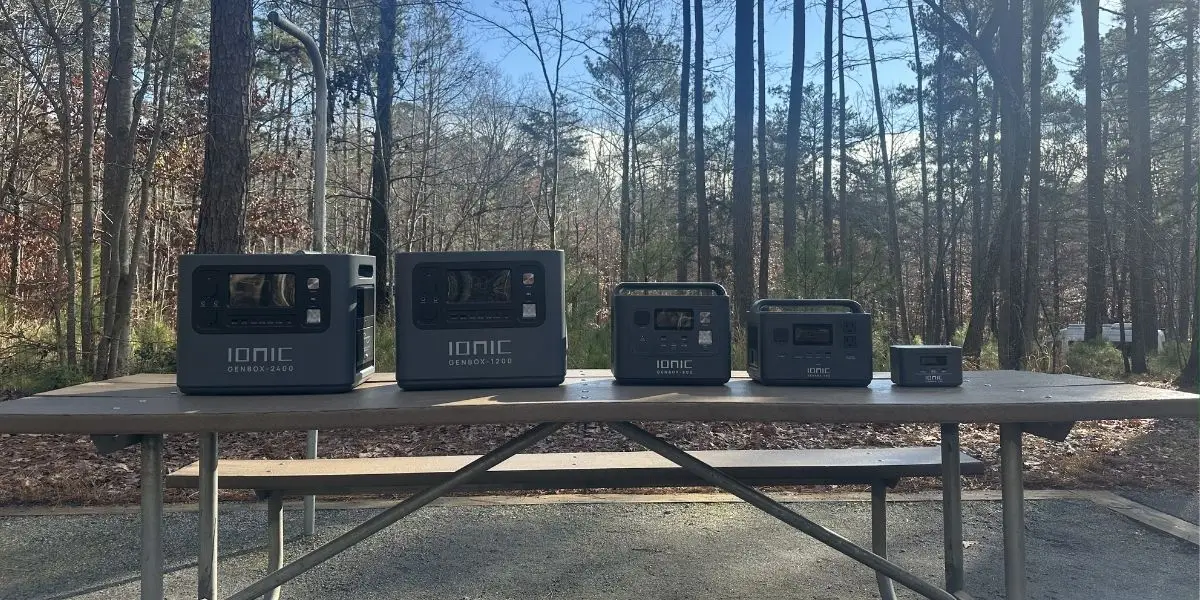
Separating your critical loads from general essentials is the single most important step you can take before an outage ever starts.
Step 1: Pick Your Essentials First
We touched on this above, but this is the step that shapes everything else. A GenBox works best when it has a clear job. Instead of trying to power everything, start by deciding what really needs to stay on if the outage keeps going.
A helpful way to do that is to separate critical loads from general essentials.
Critical loads are the things tied to health, safety, preventing damage, or protecting something that becomes more urgent as time goes on, such as:
- CPAP and other medical devices
- Sump pump or similar protection equipment
- Basic communication needs during emergencies
- Refrigerator and freezer support, especially if you need to protect food, medication, or stored breast milk
Essential loads are the things that help keep the house functional and a little more comfortable:
- WiFi router and modem
- Phone charging and a laptop
- A few LED lights
- A fan or other small comfort device, if your setup can handle it
This gives you a more realistic starting point and helps you protect the things that matter most without draining power too fast.
If you have more than one GenBox, it can make sense to keep critical loads on their own unit so you’re less likely to run into frustrating tradeoffs later.
Step 2: Choose the Right GenBox Size
GenBox power stations come in multiple sizes because backup needs look different from one home to the next. Some people mainly want to keep WiFi, lights, and phones going. Others need support for a fridge, medical devices, or more devices throughout the day.
When you’re choosing a size, two things matter most: how much the unit can handle at once, and how long it can keep things running. If too many devices kick on at the same time, the unit can hit its limit. And even if it can handle the load, the battery still has a limited amount of stored power, so bigger loads will drain it faster.
That’s why there isn’t one best size for every outage setup. The right choice depends on what you want to keep running, how long you want to run it, and whether you’ll be able to recharge during the outage.
A helpful way to think about it is baseline plus bursts. Your baseline is the stuff that stays on, like WiFi, a few lights, or medical equipment. Bursts are things that run here and there, like a microwave, a coffee maker, or some TV time. The more of those occasional extras you want to fit in, the more size starts to matter.
A quick way to estimate what size makes sense:
- List the essentials you’d want during an outage
- Check the wattage for each item on the label or with a plug-in meter
- Estimate how many hours a day you’d realistically use each one
You don’t need perfect math to make a smart choice. You just need a realistic plan. Fridge support, WiFi, a few lights, and a little TV time can add up faster than people expect over a full day. If your daily use starts getting close to what one unit can store, the answer is usually either more battery capacity or a dependable way to recharge each day with solar, a vehicle, or short generator run times.
That’s why a focused essentials list matters so much. The tighter the plan, the easier it is to make your backup power last, and the easier it is to recharge realistically during a longer outage.
Step 3: Set Up GenBox Room by Room
Once you know what needs power, the next step is deciding where that power is going to do the most good. In most outages, you don’t need to think about the whole house. You just need to keep a few key spaces working.
For most people, that means starting with the kitchen, then thinking about the main living area, and then the bedroom if overnight comfort or medical equipment matters.

A reliable backup plan isn’t just about how much power you store — it’s about having a recharge strategy that keeps essentials running day after day.
Kitchen Setup
The kitchen is often the first place to focus on because of the refrigerator. If protecting food matters, this is usually one of the biggest priorities. Keep the setup simple, keep the cord run short, and make sure nobody is stepping over cables.
A typical kitchen setup might include:
- Refrigerator
- WiFi router and modem, if they’re nearby
- Phone charging
- A lamp or a couple of LED lights
One of the easiest ways to stretch your battery here is to open the fridge less. The more you keep cold air in, the less work your setup has to do.
Living Room or Home Office Setup
This is usually where people gather, charge devices, stay connected, and try to keep life feeling somewhat normal. It’s often the best place for lights, phones, internet, and maybe a laptop if work still needs to happen.
A typical setup here might include:
- WiFi router and modem
- Phone chargers
- A lamp or a few LED lights
- Laptop
- TV, if it makes sense for your setup
This is also a good place to be selective. Running a TV for a while is different from leaving it on all day.
Bedroom Setup
If someone uses a CPAP or another medical device, the bedroom may need to be part of the plan from the start. Even without that, a little light, phone charging, and maybe a small fan can make a long outage much easier to deal with at night.
A typical bedroom setup might include:
- CPAP or other medical devices
- Phone charger
- A bedside lamp or small LED light
- Small fan if your power budget allows it
Using Multiple GenBoxes
If you have more than one GenBox, you can build a more flexible and dependable backup setup. For example, a GenBox Slim can stay dedicated to your refrigerator to help protect food, medication, or breast milk, while another unit powers lights, communication devices, or other critical loads elsewhere in the home. This can make longer outages easier to manage, help spread out power demands, and keep you from relying too heavily on a single unit.
Step 4: Stretch Runtime Without Making Life Miserable
Once your GenBox is running the essentials, the next goal is to make that power last without making the outage miserable. A lot of people burn through batteries faster than they need to because too many convenience items stay on, or too many things are running at once.
A few practical habits help a lot:
- Keep a small baseline load running, then rotate everything else
- Avoid stacking power-hungry devices at the same time
- Use short bursts for bigger items, then go back to essentials
- Check the display after plugging something in so you can spot big jumps in power use
Do this well, and your power station starts to feel a lot more predictable during a longer outage.
Step 5: Recharging When the Outage Keeps Going
A GenBox works great when the outage is short. But if the outage keeps going, the goal shifts. It’s no longer just about making the battery last as long as possible. It becomes about keeping the essentials running, then rebuilding charge whenever you have a good opportunity.
Think of it like pacing. Use power on purpose, then look for a recharge window. The more ways you have to recharge, the less stressful a long outage feels.
AC Wall Charging
If grid power comes back, even for a while, wall charging is the easiest way to put power back into your setup. It’s usually the fastest and simplest recharge option, so it makes sense to take advantage of it whenever it’s available.
Solar Charging
Pairing your power station with compatible solar panels is one of the most practical ways to extend your outage plan. It gives you a way to recharge during daylight without relying on fuel or the grid. Solar isn’t always fast, but steady top-offs can keep the essentials going day after day.
- A few habits make solar work better:
- Put the panels in full direct sun
- Start charging early instead of waiting until the battery is very low
- Reposition the panels if possible, as the sun changes
You don’t necessarily need to recharge it all the way every day. The goal is just to put enough power back in to keep the essentials going.
Vehicle Charging
Vehicle charging is slower, but it’s a useful backup option when you need another way to top off. It works best for smaller, steady needs like phones, WiFi, lights, and other basics, or for adding a little extra charge during errands and short drives.
Generator Charging
If you already have a generator, it can also be used as a way to recharge your power station during a longer outage. That gives you another option for putting power back into the battery without relying only on solar or vehicle charging.
Whether you’re looking to save money, reduce your reliance on grid power, or simply make the most of your solar investment, GenBox offers a cost-effective way to get more out of your home battery backup system.
Which GenBox Is Right for You?
Our GenBox lineup gives you a few different ways to build your backup plan, whether your goal is covering the basics, supporting larger essentials, or keeping a key appliance protected automatically. There is also a Slim option designed to stay at home and stay ready, which makes it especially useful for dedicated backup.
The simplest way to choose is to start with what you want to keep running, then match that job to the GenBox that makes the most sense.
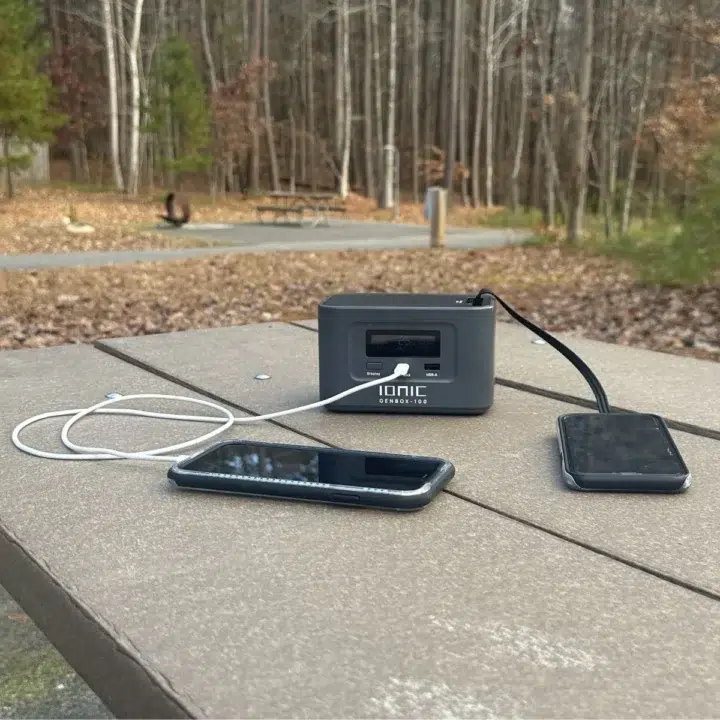
GenBox 100
Best For: Very light backup and grab-and-go power. If your main goal is charging phones, keeping small personal devices powered, and having a simple emergency power option for the basics, this is the smallest and most portable place to start. It makes the most sense for short outages, quick charging needs, and situations where you do not need to run larger household devices, but still want something more dependable than a standard power bank. See more…
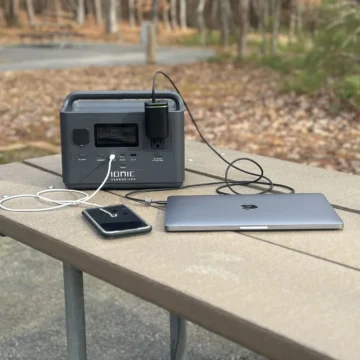
GenBox 400
Best For: Covering the basics without overdoing it. If your main goal is keeping your router and modem up, charging phones, running a CPAP, and handling a few small essentials, this is a solid place to start. With 300Wh of LiFePO4 capacity and 400W AC output, it is a real step up from a power bank, but still easy to live with. See more…

GenBox 800
Best For: A little more breathing room. This is where you move beyond just phones and WiFi and start covering more meaningful outage needs. With 518Wh of capacity, 800W pure sine wave output, and 1,600W surge capability, it’s a better fit for things like a home office setup, sensitive electronics, and some lighter appliance support when needed. See more…

GenBox 1200
Best For: A more serious home backup setup without jumping all the way to the biggest unit. It has 1,000Wh of capacity, 1200W pure sine wave output, 2,400W surge capability, and built-in UPS protection, so it makes a lot of sense for people who care about keeping important devices from dropping suddenly. It’s a strong option for refrigerator backup, medical devices, and stronger internet, plus office coverage during an outage. See more…

GenBox 2400
Best For: Running more with less compromise. If your backup plan includes larger loads, longer runtime, or powering multiple important devices at once, this is the GenBox that gives you the most room to work with. With 2,048Wh of capacity, 2,400W pure sine wave output, 4,800W surge capability, UPS backup, and expandable capacity, it is a stronger fit for refrigerators, freezers, sump pumps, and other bigger essentials, especially if you want faster recharge times and more solar-ready flexibility. See more…
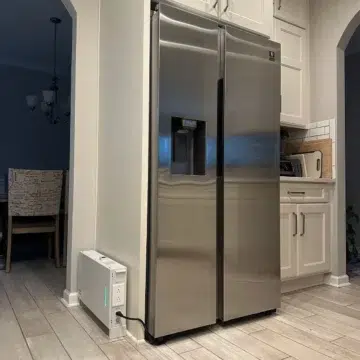
GenBox 1200S Slim
Best For: Keeping a refrigerator, freezer, or another key appliance protected automatically. This one feels different from the others because it is designed to stay in place and stay ready, not get moved around during an outage. It can be wall-mounted or set on a floor stand near your refrigerator, freezer, or another essential appliance, so it is always plugged in and always ready to respond. With 1,382Wh of capacity, fast UPS switchover, and expandable capacity up to 5.5kWh, it is a strong fit if your goal is protecting one of the most important things in the house with automatic 24/7 backup and less hassle. See more…
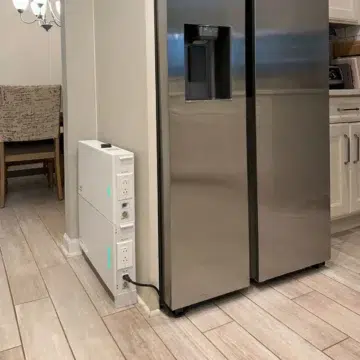
GenBox 1.3B Expansion Battery
Best For: Getting more runtime from your GenBox 1200S Slim. This expansion module adds 1,380Wh per battery and lets you build up to 5.52kWh total capacity with the base unit. It is a practical option if you want your Slim setup to protect a refrigerator, freezer, or other key appliance for much longer during an outage. Important: it only works with the GenBox 1200S Slim and cannot operate on its own. See more…
Why More Than One GenBox Can Make Sense
For some homes, having more than one GenBox is actually the better setup. Instead of asking one unit to do everything, you can split the job up in a way that feels simpler and more practical during a real outage.
One unit might stay focused on critical loads, like a CPAP, refrigerator, or communication needs, while another handles general essentials in a different room. That can make it easier to avoid frustrating tradeoffs, especially if the outage lasts longer than expected.
Using multiple units can also give you more flexibility with recharging. You might keep one powering the essentials while another is topping off from solar, a vehicle, or a generator. It is also just easier to build around the way people actually live, since outages usually affect a few key rooms, not the whole house, all at once.
If your goal is more coverage, more flexibility, or less juggling, a multi-unit setup can make a lot of sense.
A few common ways to split things up:
- One unit for kitchen and refrigerator backup, one for bedroom or medical needs
- One unit for internet, lights, and charging, one for heavier essentials
- One unit is in use while another is recharging
Bringing It All Together
The goal isn’t to keep everything running as if nothing happened. It’s to protect the things that matter most, use your stored power wisely, and have a plan for longer outages.
That starts with knowing your priorities. For some homes, that means keeping a refrigerator cold and the internet up. For others, it means covering medical equipment, lights, and a few basics in the rooms that matter most. Once you know that, it becomes much easier to choose the right setup and use it well.
Our GenBox lineup gives you different ways to build that kind of backup plan, from smaller units for the basics to larger options that give you more coverage and flexibility. And if your goal is dedicated appliance protection, the GenBox 1200S Slim gives you a stay-at-home option that’s built to be ready when the power drops.
The best setup is the one that fits your home, your priorities, and the way you would actually use it when the lights go out. Since every GenBox is solar compatible, you also have the flexibility to recharge and extend your backup plan beyond the power already stored in the unit, which can make a big difference during longer outages.
Ready to find the right fit? Check out our full GenBox lineup here.
FAQ: Battery Backup for Power Outages
Will a GenBox run a refrigerator during a power outage?
Yes. We offer GenBox models designed to pair well with refrigerators during outages, especially the GenBox 1200S Slim, which is built for stay-at-home backup near the appliance you want to protect most.
The right fit still depends on the refrigerator and the GenBox model, but if food protection is a priority, this is one of the smartest ways to use backup power.
Can I Safely Run A Space Heater Or Window AC From A Battery Backup?
For space heaters, most standard plug-in models use up to 1,500W on high. That is too much for the GenBox 400, 800, and 1200, but some may run on the GenBox 2400 depending on the heater’s exact wattage setting. Even then, space heaters use a lot of power and drain stored energy quickly, so they are usually not a practical choice for extended runtime.
For window AC units, it depends on the model. Some smaller units may run on the GenBox 1200, but you also have to account for the startup surge when the compressor kicks on. The GenBox 2400 gives you more room for higher loads, but AC units still use stored power quickly, so they are generally better for short-term or limited backup use than for all-day cooling.
Is It Better To Buy One Big Battery System Or Several Smaller Units?
Both can be smart choices. One larger unit gives you a simpler setup with more power in one place, which can be ideal for bigger loads or a more centralized backup plan. Several smaller units give you more flexibility, let you spread backup power across different rooms or priorities, and can make longer outages easier to manage through charging rotation. In many cases, it is less about which approach is better overall and more about which one fits your home and the way you want to use backup power.
Do I Need An Electrician To Use A Portable Battery Backup?
No, for plugging devices directly into the unit, it’s plug-and-play. An electrician is needed only if you want to power home circuits via the electrical panel using a transfer switch.
Can I Use GenBox Indoors?
Yes. GenBox is battery-powered with no exhaust, making it safe for indoor use. Keep it dry and well-ventilated. Generators, however, must be used outdoors.
How Do Solar And Vehicle Charging Compare In Real Life?
Solar charging is best for multi-day outages, providing steady recharge during the day. Vehicle charging is slower but useful as a backup, especially when solar isn’t available. Vehicle charging is better for topping off basics, not full recharges.
How Should I Store My Battery Backup When It’s Not In Use?
Store in a cool, dry place out of direct sunlight. For long-term storage, keep it about half charged. Check and recharge every few months and do a quick test run to ensure readiness.

Ready to Build Your Backup Plan?
Explore the full GenBox lineup and find the right fit for your home, your priorities, and the outage scenarios that matter most to you.